The Chrome browser uses different profiles easily and conveniently. It is quite different issue in Firefox, where you have to hack around the command line to switch user profiles. To bypass this long process, we recommend that you familiarize yourself with the extension Switchy.
First of all, you should know what user profiles is all about in Firefox, and why you need them. The user profile stores all your settings, bookmarks, passwords, and extensions. You can have several different independent sections, each with its own set of data is stored. This can come in handy in the following situations:
You are using different profiles for different types of activities. For example, you have your set of extensions and options for entertainment – the other.
Your computer and the browser is used by several family members. Each person has a profile that contains its own set of bookmarks and passwords.
You are actively experimenting with new additions. It is better to use a special experimental profile, which does not affect the remaining issues in the case of sensitive data.
Currently, access to the Firefox Profile Manager can be obtained only by running a browser with a special command line parameter. Of course, this is inconvenient. Expanding Switchy solves this problem and makes the use of profiles, such as convenient as in Google Chrome.
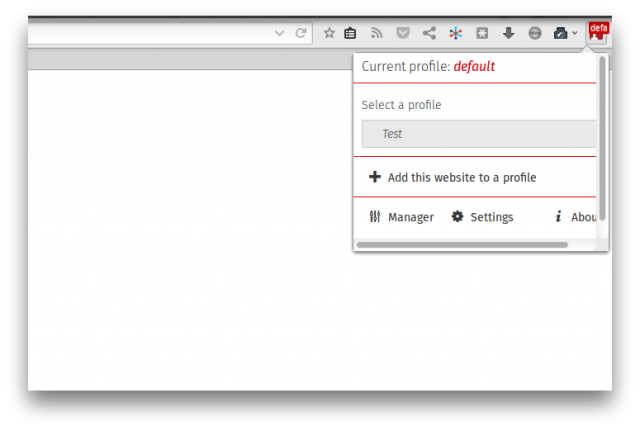
After installing the extension on your browser will be a new button. Clicking on it will open a pop-up window in which you can quickly switch to the desired profile.At the bottom of this screen are buttons that allow to run the built-profile manager, go to the settings Switchy and learn about its developers.
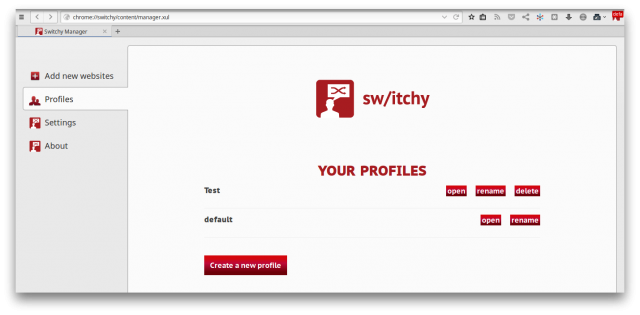
Switchy Manager provides the ability to create, rename, or delete user profiles. Its interface is extremely simple to understand why it’s work can be without any difficulty.
Although in Firefox Add-ons store, there are several developments that perform similar tasks, Switchy stands out among them, the exclusive ability to binding sites to specific profiles. This means that every time you go, for example, Facebook, Switchy will offer you to switch to a profile assigned to it. In some cases it may be convenient to provide additional privacy and security of your data.
Switchy profile manager is FREE in the Firefox extension and plugins stores and can be downloaded directly below;

[…] who do not like it just because they can’t switch profile just like in Chrome, check out this Firefox Profile Manager […]