I do not enjoy switching tools. It is rarely fun, and it is never “just a login change.” You have client workspaces to set up, team habits to retrain, and a dozen little edge cases that only show up once you are mid-campaign.
Still, I moved our agency workflow to OnlySocial’s Whitelabel, and it has been one of the best decisions I have made recently.
This is a long, honest review of what changed for us, what we actually use day to day, and why I think it is one of the best options right now if you want a social media management whitelabel platform that is affordable, agency-friendly, and built for productivity.
If you are searching for the best social media management whitelabel, an affordable whitelabel option, or even researching how to start a social media management SaaS without building software from scratch, this should help.
My quick take
OnlySocial Whitelabel works because it lines up with how agencies actually operate.
- We started on WL10, then upgraded to WL25 after a few weeks.
- The upgrade was seamless: it took less than 10 minutes, with no downtime.
- We can schedule to 15 social profiles at once in a single click in our workflow.
- Unified Inbox lets clients manage comments and DMs in one dashboard.
- When we manage a client workspace, switching between workspaces to reply is fast, and it comes with an AI copilot option.
- It includes “extra” tools business clients care about, like pre-scheduled video livestream, link in bio tools (with custom domains), QR codes, and vCards.
- Billing can happen inside the system (we integrated our Stripe), so onboarding is much smoother.
Paying $197/month for 25 client workspaces feels like a steal compared to many alternatives once you account for real whitelabel depth.
What OnlySocial Whitelabel is, and what “whitelabel” should mean
A lot of platforms use the term “whitelabel,” but the definition changes depending on who you ask.
Sometimes it means whitelabel reports only—you can export a PDF with your logo and colors.
Sometimes it means a client portal, but it still looks like the vendor’s product, just with a logo swap.
Sometimes it means whitelabel exists, but it is locked behind a high tier—then you discover you still need extra add-ons to make it feel complete.
OnlySocial Whitelabel is closer to what agencies usually mean when they say they want a social media management whitelabel platform.
It is designed to run under your own brand, typically with:
- A custom domain
- A branded client-facing experience
- A workspace model that maps neatly to “one client, one workspace”
- Publishing and scheduling features designed for volume
- A Unified Inbox for engagement management
- Optional billing and invoicing so you can sell it like a product
That last point matters more than people think. If you want to productize your service, or if you are exploring how to start a social media management SaaS, you need more than a scheduler. You need a platform experience clients can log into, plus a subscription flow that does not feel duct-taped together.
Why we switched in the first place
Before OnlySocial, our biggest pain points were not “can we schedule posts.” Most tools can do that.
The pain was operational:
- Scale friction
When you go from a handful of clients to 10, then to 20, then beyond, the small annoyances become big problems. Switching accounts becomes slow. Client onboarding becomes repetitive. Every extra step multiplies. - Engagement chaos
Comments and DMs live everywhere—Instagram here, Facebook there, Google reviews somewhere else. It is easy for clients to miss things, and it is easy for agencies to burn time context-switching. - “Whitelabel” that is not really whitelabel
Some tools do a good job with reports, but the client still feels like they are inside someone else’s software. If you are trying to look premium as an agency, or you are building a SaaS-style offer, that matters. - Pricing that punishes growth
A lot of competitors are solid products (Cloud Campaign, SocialPilot, Agorapulse, CoSchedule, SocialBee), but the pricing model often gets complicated as you add more clients, users, profiles, or add-ons. It is not always “expensive”—it is unpredictable, and unpredictability is stressful when you are trying to grow with confidence.
OnlySocial Whitelabel fit what we needed: a predictable, branded system that supports agency workflows without forcing us into an endless upgrade ladder.
WL10 to WL25 upgrade, one small detail that told me a lot
We started with the WL10 plan. That was intentional. I prefer to test tools under real client conditions before scaling up.
Within a few weeks, we upgraded to WL25.
This is where many platforms get messy. Upgrades can trigger weird permission issues, billing resets, settings changes, or client confusion. If clients notice your tools changing, you end up doing support calls instead of delivering results.
Our WL10 to WL25 upgrade on OnlySocial was calm:
- Less than 10 minutes
- Seamless
- No downtime
- No disruption to client access
That sounds basic, but it is not always the reality. For an agency, stability is a feature. It is also one reason I trust it as the backbone of a long-term workflow.
The features we actually use, and why they matter for agency productivity
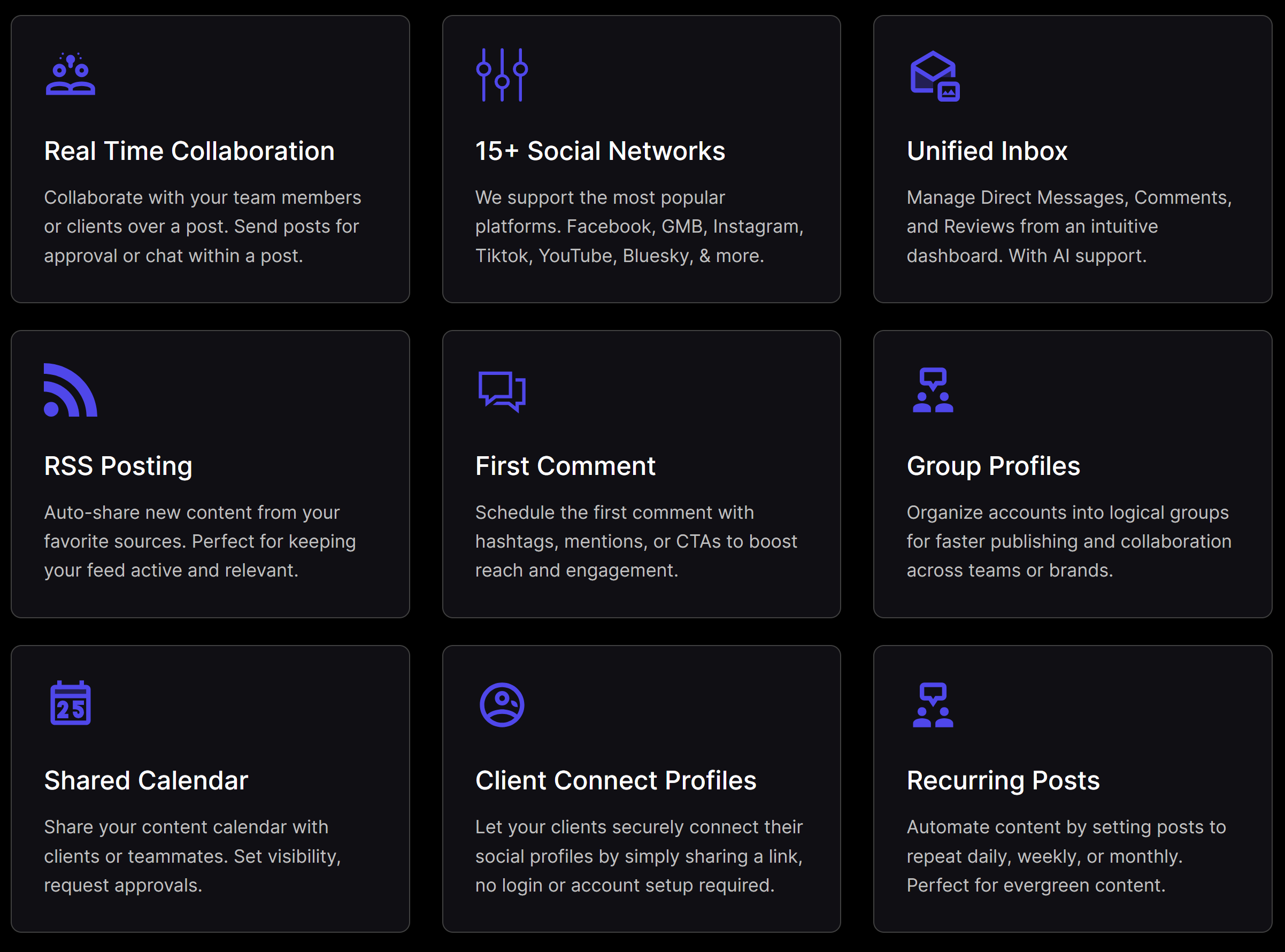
I am not going to list every feature on the product page. This is what we actually use, what we noticed immediately, and what changed our daily workflow.
1) Scheduling to 15 social profiles at once, in one click
This is the most valuable feature for our workflow.
We can schedule content to 15 social profiles at once in a single click. For agency work, this is huge.
Think about the kinds of situations where this matters:
- A multi-location business with a lot of location pages
- A brand with multiple properties, multiple regions, multiple verticals
- A campaign that needs to be consistent across many channels at once
- A client that wants “post this everywhere,” and they mean it
Without strong multi-profile scheduling, your team ends up repeating the same action again and again. That repetition is where mistakes happen, and it is where margin disappears.
This feature does two things:
- It saves time, which directly improves productivity
- It reduces human error—fewer missed profiles, fewer “why didn’t this go to X account” problems
For me, that is what “agency-grade” looks like—not fancy dashboards, but practical speed in the places where work piles up.
2) Unified Inbox that clients can use, plus fast workspace switching for us
OnlySocial’s Unified Inbox is another feature we use constantly.
Clients like it because it gives them one dashboard to manage engagement. They can see comments and DMs in one place. That alone reduces missed messages and reduces the need to bounce between apps.
From the agency side, the biggest win is how quickly we can handle multiple clients. When we manage a workspace on a client’s behalf, we can switch between workspaces to reply without losing context.
This matters more than most people realize. Engagement work is often “small tasks” that destroy your day: a comment here, a DM there, a review reply. It looks simple until you are doing it across many clients. A unified inbox, paired with fast workspace switching, turns chaos into a manageable routine.
AI copilot inside the inbox
The Unified Inbox also includes an AI copilot option. I treat it like a drafting assistant, not autopilot.
It is useful for:
- Drafting quick reply options
- Keeping tone consistent across a client’s brand voice
- Speeding up repetitive support-style responses
It does not replace judgment. You still review, especially when the message is sensitive. But it reduces the time it takes to get from “blank screen” to “good first draft.”
3) Pre-scheduled video livestream
Not every client uses live video, but for the ones who do, this is genuinely helpful.
Live sessions often create last-minute chaos. Someone wants to go live, someone wants the teaser posted, someone wants reminders—and suddenly you are scrambling.
Pre-scheduling livestream content inside the same platform as the rest of the content calendar keeps everything consistent. It also makes the client’s schedule feel like a real system, not a collection of reminders.
4) Link in bio tools, custom domains, QR codes, vCards
This is one of those areas where OnlySocial surprised me.
Many social media tools stop at scheduling, analytics, and maybe inbox. OnlySocial includes extra tools that business clients actually understand and care about:
- Link in bio tools (including custom domain support for the link tools)
- QR code creation and management
- vCard creation
For business clients, these are not gimmicks.
Link in bio pages are one of the most practical conversion tools, especially for Instagram and TikTok.
QR codes are everywhere now—menus, storefronts, flyers, events, even on invoices. When a client asks for a QR code, it is nice to say “yes,” without adding yet another tool.
vCards are useful for teams, sales staff, founders—anyone who networks. It is a small feature that feels premium because it is easy for clients to use.
The bigger point is this: when these tools live inside your social media management whitelabel platform, the client login becomes more valuable. They are not logging in just to “approve posts”—they are logging in to manage parts of their marketing workflow.
5) Billing inside the system, Stripe integration
This was one of the biggest operational wins for us.
We integrated our own Stripe. Billing and payments can happen on the system. That means onboarding is smoother, and it feels like a product experience.
Instead of telling a client, “Pay here, then I will invite you somewhere else,” it is a single flow.
This is also a major piece if you are thinking about how to start a social media management SaaS. A lot of people focus on software features, but SaaS is also:
- Subscriptions
- Renewals
- Packaging
- Access control
- Client lifecycle (onboarding, upgrades, downgrades)
When billing lives inside the platform and the platform is branded, you are much closer to a real SaaS model.
Pricing: why WL25 feels like a steal for agencies
OnlySocial Whitelabel pricing, as shown on their whitelabel page, includes:
- WL10: $97 per month
- WL25: $197 per month
- WL100: $499 per month
We started on WL10, then moved to WL25. Paying $197/month for 25 client workspaces feels like a steal.
The reason it feels like a steal is not because I am comparing it to the cheapest tool on the internet. It feels like a steal because agency pricing usually becomes painful when you need:
- Real whitelabel experience
- Multiple client workspaces
- Team collaboration
- Inbox features
- Scaled publishing and scheduling
A lot of the time, you end up paying per user, per account, per client—plus add-ons for whitelabeling, plus add-ons for reporting, plus add-ons for inbox.
With OnlySocial, the pricing structure feels more aligned with agency reality.
This is what I mean by affordable whitelabel. It is not about chasing the lowest sticker price. It is about a platform that stays predictable as you grow.
Where the competitors fit, and why OnlySocial still won for us
I have looked closely at Cloud Campaign, SocialPilot, Agorapulse, CoSchedule, and SocialBee. These are good products, and I am not here to pretend otherwise.
If your agency has a very specific requirement, one of these might be perfect. Some tools lean harder into reporting, some lean into social inbox depth, some lean into broader marketing calendar workflows.
For us, OnlySocial won because of the combination:
- Full platform whitelabel experience, not just reports
- Workspace model that maps to “one client, one workspace”
- Scale scheduling that lets us publish across many profiles quickly
- Unified Inbox that is usable for both clients and agency teams
- Extras like link in bio with custom domains, QR codes, vCards
- Billing integrations so it can be packaged like a product
- Pricing that makes scaling feel safe (WL25 at $197/month for 25 client workspaces is hard to ignore)
The important thing is not that OnlySocial has “more features.” It is that it removes friction where agencies lose time and money.
What changed for us after switching
Here are the practical changes we noticed quickly.
Onboarding became easier
Clients can get into their workspace, connect profiles, and start seeing value without a long back and forth. Billing is also cleaner because we integrated Stripe.
Daily execution got faster
Scheduling to 15 profiles in one click is not a small quality-of-life improvement. It is a meaningful speed increase when you run volume.
Engagement got less chaotic
The Unified Inbox reduces the “where did that message go” problem. Clients can manage engagement in one place, and we can manage multiple clients more efficiently.
We started scaling with more confidence
This is the biggest outcome, honestly. A lot of agencies hit a wall where every new client adds operational drag. With this system, we feel like we have a solid platform backing us, so growth feels less risky.
How to start a social media management SaaS with a whitelabel platform (the practical version)
If you are reading this because you want to build something productized, not just run an agency, here is a practical approach.
This is not “raise funding, hire engineers, build software for a year.” This is “launch fast, deliver value, grow steadily.”
Step 1: Pick a niche you can serve well
Do not build for everyone. Pick one group and tailor your onboarding and templates for them.
Examples:
- Local businesses (clinics, restaurants, real estate)
- Multi-location brands, franchises
- Creators, coaches, consultants
- Ecommerce brands
Step 2: Brand the experience properly
Whitelabel is not a logo. It is the whole experience:
- Custom domain
- Branded dashboard
- Branded onboarding and client messaging where possible
This is what makes the platform feel like your product, not a tool you are borrowing.
Step 3: Package it into simple subscription tiers
Keep it easy to understand:
- Starter: one workspace, scheduling, basic reporting
- Growth: Starter + inbox support and approvals
- Pro: Growth + strategy sessions, templates, priority support
If billing happens inside the system, it is easier to make this feel like a SaaS subscription instead of an invoice.
Step 4: Make onboarding fast (aim for 20 minutes)
Your goal should be first value quickly:
- Invite client to workspace
- Connect social profiles
- Set queues, schedules, templates
- Schedule the first week of posts
- Show Unified Inbox, define who replies to what
If onboarding takes multiple meetings, it will not scale.
Step 5: Retention is consistency
The “SaaS” part is not just the software, it is the ongoing experience:
- Consistent publishing
- Consistent approvals
- Consistent engagement responses
- Simple reporting rhythm
A good social media management whitelabel platform makes consistency easier because you can keep everything in one place.
Downsides and what to consider before buying
No tool is perfect. Here are the practical considerations I would mention:
- Whitelabel setup is not instant. OnlySocial mentions setup time of up to 24 hours, plan around it.
- There is typically no dedicated whitelabel trial because it is a dedicated instance model. If you need certainty, request a demo and ask workflow-specific questions.
- Social platform APIs change. This affects every platform in this category. Build a process that can handle occasional network quirks.
None of these were dealbreakers for us, but it is better to know upfront.
Final verdict
OnlySocial Whitelabel has made our agency workflow faster, cleaner, and more scalable.
The WL10 to WL25 upgrade was seamless (under 10 minutes, no downtime). Scheduling to 15 social profiles at once in a single click has been a major productivity win. The Unified Inbox reduces engagement chaos for both clients and our team, and the AI copilot helps speed up repetitive replies. The extra tools—pre-scheduled livestream, link in bio with custom domains, QR codes, vCards—are surprisingly valuable for business clients. Stripe integration makes onboarding and billing feel like one product.
If you want an affordable whitelabel platform that can also serve as the foundation for how to start a social media management SaaS, OnlySocial is worth serious consideration.
Official page: https://whitelabel.onlysocial.io/
Disclosure: This review is based on our real usage and experience. Pricing and features can change, always verify details on the official vendor pages before purchasing.