Speed, security, privacy, ergonomics, rich functionality … After reviewing the navigation tools, design and user friendliness from every angle, the shy and discreet Opera which trumps with the market leaders such as Chrome, Firefox or Safari. Which among them is really the best internet browser?
Which is the best internet browser?
I have used different factors to review each and every one of these browsers to determine which among them is the best. Though opinions may differ based on what we do on the internet, which determines what browser is best for us. I personally love to use all of these browsers for my day to day activities depending on what I’ll like to do.
Looking for the best browser? You might just stick to your current browser or fall in love with a new one after reading through this review.
Google Chrome: Genuine Swiss Army knife of the Web
For Google, Chrome has already outgrown the browser since it has become a full-fledged system (Chrome OS). That speaks a lot about its possibilities.
Ergonomics : Since its inception, Chrome put on sobriety. Its favorites bar gives direct access to applications of Google ( YouTube , Gmail, Drive …). In contrast, opening history proves less obvious.The interface is a little too minimalist to be explicit.
Features : As long as you log in with your Gmail account , it is the whole galaxy of Google Apps, which is just a click away. One advantage, among others, is the remote printing (Google Print) feature, the takeover of another computer (Google Remote) and a built-in translator (which is one of my favorite tool). It is even possible to add applications that do not require the browser to operate such Facebook , Deezer , or Pixlr .
Security : Flash is integrated into the browser and thus automatically benefit from all the latest updates, security guarantee. In contrast, Google collects a variety of data through Chrome, and records everything that is entered in the address field (queries such as websites URLs) even if we do not start the search.
Performance : It is rather fluid and very comfortable with HTML5 websites. But it shows the uses too much of the CPU and RAM: 500 MB used to open ten tabs. Chrome is strongly recommended for the highly equipped RAM configurations.
Extras : Chrome supports Chromecast , a device designed to distribute the browser content on a TV. When all things being equal, do you think this is enough to consider Chrome the best internet browser?
The weakness : It lacks a simple feature page sharing as proposed by default Edge and Firefox . To use this feature, you must install an extension.
Is Chrome your best internet browser? Download Chrome.
Microsoft Edge: Navigate Safely
Edge embodies the Microsoft resurrection in the great family of browsers. And the firm is also all it takes for it to quickly finds its place. Starting with the imposing as the default browser in Windows 10 (only OS on which it can rotate).
Ergonomics : Edge does not reinvent the wheel in terms of design. Like its competitors, it adopts a refined interface. Edge is sometimes difficult to navigate. Favorites management, for example, requires unwinding several menus to organize. However, we like the “Sharing Immediately” button to mail a web page, integrate in a note, or post it on your Facebook wall.
Features : The browser loads a note taking system accessed directly on the Web page. One can understand its annotations to the mouse or keyboard. It also has tools to highlight passages of text, surround, etc. You can then save the notes in OneNote or share them with contacts.
Security : Exit the toolbars and other scripts Visual Basic and ActiveX . Edge takes the most care, which avoids polluting the browser and expose Windows to malware and adware . Moreover, each new tab opens in a secure and independent environment. If one views a web page that is “unhealthy”, it is isolated in a sealed space.
Performances : Smooth and responsive, Edge tops the rankings. However, it is very greedy in RAM (600 MB used to open ten tabs). Avoid, unless you have a PC of over 2GB of RAM.
A plus : A video played from YouTube can occupy the entire window. A good intermediary between the full screen and the small window provided by the video service.
The weak point : Edge receives no extension. A very weak point of the Edge browser considering the era we are in where the best internet browsers are judged based on the extensions available. Microsoft has not said when it will be possible to add extension to the browser.
Is Edge your best internet browser?
Opera: An innovative browser, light and swift
Although in the shadow of the big names in the Web browser industry, Opera does not leave any stone unturn and constantly enriched with brilliant features. The alternative to stars browsers on the market, this tool has more than one trick up it’s sleeve.
Ergonomics : The interface of Opera shows the current principles. It is therefore not confused. We appreciate the rectangular tabs which makes them more legible.
Features : Like Firefox and Chrome, Opera can be enhanced with extensions designed specifically for it. But recently, it also accepts those developed for the Google Chrome browser. This requires the develop module Download Chrome Extensions .
Security : Clever, the browser reports with a pictogram at the start of the address field if viewed site is reliable and secure, even if it uses your webcam. Moreover, for more privacy, nothing prevents you to disable the prediction service for typing in the address bar.
Performances : Opera is revealed rather well optimized and highly responsive in loading pages.Fifteen tabs open does not scare him and does not penalize navigation. We like the Turbo mode which compresses web pages to display faster. A very convenient option when the Internet connection is slow.
Extras : the top right button list open tabs. Practice when scramble to the top of the window. When all things being equal, do you think this is enough to consider Opera the best internet browser?
The weak point : Opera has no tool to export your favorites to another browser.
Is Opera your Best Internet browser? Download Opera.
Abandoned since 2012 on Windows, Safari continues its merry way on Mac OS. It is becoming better integrated into the system and home services.
Ergonomics : The latest version introduces the ability to pin tabs. A simple way to keep at your fingertips, with a simple icon, open sites throughout the day in the browser without them cluttering up the tab bar.
Features : sharing functions are preferred to return a page via email, Facebook, etc. While also designed, the address field, which when typing, offers suggestions collected by Spotlight from several sources, not just Google.
Security : Each displayed Web page runs independently, so that attacks from “unhealthy” websites remain confined.
Performance : As Edge on Windows 10, Safari is uniquely optimized for Mac OS X. Spotlight Indexing by what is entered in the address bar does not weigh on its reactivity.
Extras : Owners of an Apple TV box will enjoy the function AirPlay built-in Safari and so on broadcast their TV, video content from websites. When all things being equal, do you think this is enough to consider Safarithe best internet browser?
The weak point : the catalog of extensions available for Apple’s browser pales against those of Chrome, Firefox and Opera.
Firefox: Respectful of privacy

Firefox remains one of the favorites of internet browsers for its simplicity, confidentiality and generous extensions catalog.
Ergonomics : It is the only browser to have a separate search field in the address bar. You can place shortcuts of your choice in the menu bar for quick access to desired functions (history, private browsing, full screen, etc.).
Features : A simple right click in a blank area of a page provides access to multiple options: share via email or social networks, games, rewind … The Hello feature, meanwhile, allows video chat with your contacts, and live sharing of open tabs.
Security : By default, Firefox blocks the Flash player for his often controversial security vulnerabilities. It also is very discreet about your personal data. It does not record what you type in the address field, unlike Chrome or Edge.
Performances : It shows a good fluidity, even with more than 15 tabs open simultaneously . However, using Flash is lightly penalized, sometimes causing a drop in re activity. The wide range of extensions available for the browser multiplies to infinity its possibilities. But beware not to add on pain of seeing row.
Extras: Firefox is enriched with tons of extensions. For those who do not like it just because they can’t switch profile just like in Chrome, check out this Firefox Profile Manager extenstion
The weak point : Like Edge, Firefox takes his ease with the RAM (400 MB with over ten tabs open), which can slow PCs with little RAM. A problem that tends to resolve over the versions.
Is Mozilla Firefox your Best Internet Browser? Download Firefox Now.
Internet Explorer 11: Still alive but already buried
Long criticized for its security flaws, the design of another age, its slowness and its aging features, Internet Explorer bows out with the arrival of Edge Windows 10. Well, not everything. Microsoft has kept it in it’s new system, but by hiding the Windows bottom end in the Accessories folder. For Internet Explorer still account for a significant share of users. But beware: only the 11 version of the browser will benefit, for some time, for updates. We know the internet explorer is definitely not the best internet browser, but do you still enjoy using it?
Tor Browser: Surfing discreetly
Here is a browser like no other. Tor Browser not only offers anonymous surfing on the traditional Web, but also a gateway to the hidden sites, the famous darknet .
Ergonomics : Tor Browser is actually a modified version of Firefox (38.3 release). It adopts the interface, such as the presence of two buttons to the address bar. One is used to disable Java Script, the other to refine settings for connecting to the Tor network.
Features : Focused on security and privacy, Tor Browser comes with dedicated extensions enabled by default, such as HTTPS Everywhere , which will seek to establish a connection to all sites in secure mode, or NoScript to prevent the execution of script on pages visited.
Security : It is of course the highlight of the browser. By default, all connections are encrypted and it never goes out of private browsing mode (no surf given or password are not kept).
Performances : Multiplying security barriers and operating a very secure connection mode (point to point), do not expect that Tor is a lightning war. Such is the price to pay for peace.
Extra : You can use this browser to surf websites that your provider makes normally inaccessible. When all things being equal, do you think this is enough to consider Tor browser the best internet browser?
The weak point : It’s slow and unusable daily for comfortable use of the Internet.
Is Tor Browser the best internet browser? Download Tor.
Vivaldi Technical Preview 4: The ace of customization
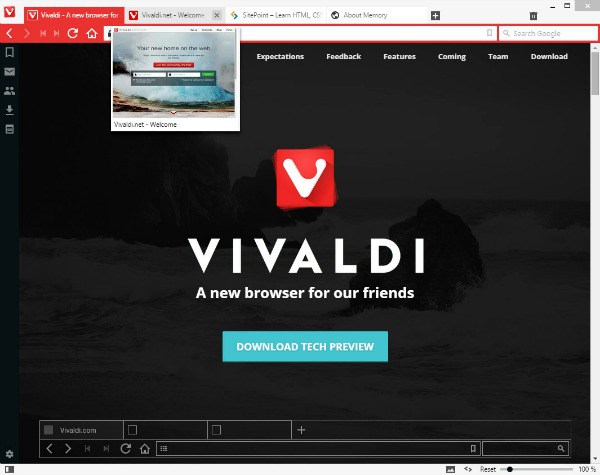
Designed by the founder of Opera (who left the company in 2011), Vivaldi is a newcomer full of promise, but still running.
Ergonomics : Vivaldi setting customization .. One can thus adjust the size of the font used by the browser, change the interface theme, place the tab bar and the top or bottom address bar … The user is free to organize its space as it sees fit.
Features : One of Vivaldi’s strengths is its handling of tabs. The search field can be used to find an open tab. It is possible to better identify by assigning a color to each tab but also to create “Folders” tab where are grouped all open pages of a website.
Security : The Flash module integrated into the browser to ensure its systematic updating, not working currently. For more discretion, Vivaldi invites to separate the search field in the address bar.
Performances : Difficult to assess, the achievements of this browser is not yet finalized.Encountered some delays in loading pages, spent eight tabs open simultaneously.
Extra : Its integrated task manager lists all pages open with the hardware resources used. From here, you can force the closure of a page if necessary. When all things being equal, do you think this is enough to consider Vivaldi browser the best internet browser?
The weak point : No catalog of extensions available for the browser. However, it can be used with modules planned for Chrome.
Have you ever used the Vivaldi Browser? Do you consider it as the best internet browser? Download Vivaldi Now.
Leave a Reply
You must be logged in to post a comment.